What is online privacy? The ultimate 2026 Guide to Digital Safety
What is online privacy? The Definitive Guide to Protecting Your Data (2026)
In an era of constant data harvesting, understanding what online privacy is the first step toward reclaiming your digital freedom. As our daily lives move deeper into the cloud, your personal information has become a valuable commodity for advertisers, hackers, and data brokers alike. Maintaining your digital privacy isn’t just about hiding; it is about the fundamental right to control how your sensitive information is collected and shared across the web. According to the Electronic Frontier Foundation, staying informed about your digital rights is essential for modern safety.
The online privacy definition Online privacy is the right to control who obtains your personal data and how it’s collected, used, shared and stored. In this guide we will break into why your data is the new gold and how exactly you can construct a digital fortress around it.

The Core Pillars: What is Online Privacy Actually?
Online privacy isn’t all about the “bad” stuff; it’s about the basic human right to be left alone. It is of three general types:
- Privacy of Personal Information: Protection for your name, address, social security number and medical history.
- Behavioral Privacy Stopping companies tracking your clicks, search history and “digital body language.”
- Communication Privacy: That all your messages, even voice and video conversations, can only be read or heard by your designated contact.
Why Digital Privacy is Disappearing in 2026
To understand the “Data Industrial Complex,” we need to solve this problem. There are three primary entities that harvest your personal information:
1. The Big Tech Ecosystem
– Free services, like social media and search engines, are hardly ever “free”. You pay with your data. Your every like, share and hover is tracked to create a “shadow profile” of your personality.
2. Data Brokers
– These are companies you’ve probably never heard of (Acxiom or CoreLogic) that only exist to buy and sell your information. They collect information from public records, store loyalty cards and app permissions to sell to insurers, lenders and advertisers.
3. Government Surveillance
– Many governments eavesdrop on digital traffic in the name of national security. With no encryption, it’s like your private conversations are books laid open on the table.
The “Privacy Gap”: Privacy vs. Security
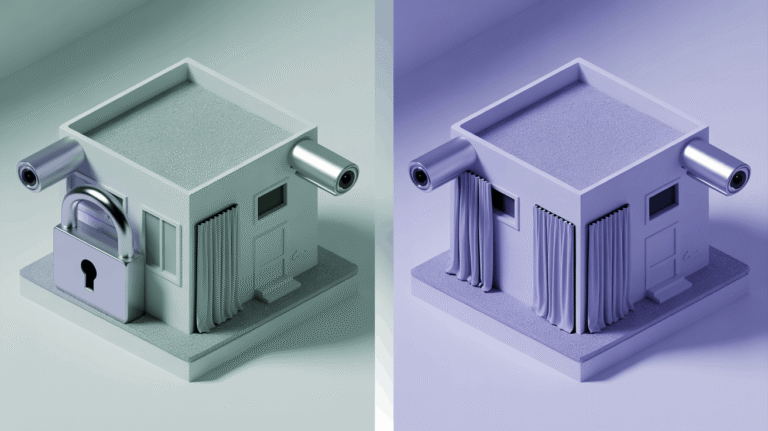
These terms are frequently used as if they were interchangeable, but they are not:
- Your Online Security is the “lock on your door.” It stops hackers from stealing your password.
- Online Privacy: Your “window curtain” matter . It stops legitimate businesses from watching everything you do inside your house.
Security can allow for privacy, but not the other way around.
Comparison: Best Privacy Tools for 2026
| Tool Type | Why You Need It |
|---|---|
| VPN | Masks IP & Encrypts Traffic |
| Encrypted Email | Prevents Email Scanning |
| Privacy Browser | Blocks Ad Trackers |
| Password Manager | Stops Identity Theft |
The Privacy Threats You Aren’t Aware Of (And Should Be)
1. “Free” Wi-Fi Networks
Public Wi-Fi is a privacy nightmare. By using a pair of the tools that Oh has refined in utter secrecy, unethical hackers can establish “Twin” networks that intercept your information through a process called “sniffing.”
2. Browser Fingerprinting
Even if you delete your cookies, sites can still recognize you based on your browser version, screen resolution and fonts. That makes a “fingerprint” that belongs to you.
3. App Permissions
Does that “Flashlight” app really need to be able to use your microphone and contact list? Many other apps take too much access to pull in data on their own
How to Protect Your Online Privacy: A Guide How to Regain Your Data Privacy: A Step-by-Step Checklist
Step 1: Use an Encrypted Connection
Make sure everything you are doing uses an encrypted connection. A VPN is the best and easiest way to hide what you are doing from your ISP.
Step 2: Let’s Trade Search Engine
Battle You don’t have to use the search engine that comes built into your browser. Google tracks every query. There are privacy-focused search engines you can try, such as DuckDuckGo or Brave Search that don’t profile users.
Step 3: Audit Your Social Media
- Turn off “Location Sharing.”
- Set your profile to “Private.”
- Restrict who can see your “Friends List.”
Step 4: Employ Multi-Factor Authentication (MFA)
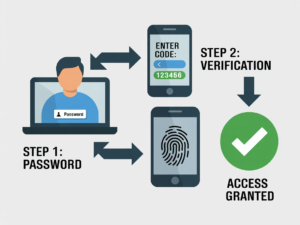
Use multi-factor authentication to reduce the risk of authorizing an unsigned request from a user with legitimate credentials.MFA is a second line of defense. Hackers can’t get into your account without a physical token or code from your phone, even if a site “leaks” your password.
The Role of Privacy Laws (GDPR, CCPA & More)
The world is fighting back. Laws such as the GDPR (Europe) and CCPA (California) have also chastened companies to be more transparent. You now have the right to:
- Ask a company what information they have on you.
- Ask them to remove your information from their records (The “Right to be Forgotten”).
- Do not sell my personal information.
Pro Tip: Automate the sending of ”Delete My Data” requests to over 100 data brokers for you with a service like [CTA].
Frequently Asked Questions (FAQ)
In 2026 the Brave Browser and Firefox (with strict privacy settings) are on top. They block trackers by default; they thwart fingerprinting.
Yes. Incognito mode just doesn’t save history in your browser. Everything, except your ISP, your employer and the websites you visit can see. The only thing that can hide your activity from an ISP is a VPN or Tor.
—100% total privacy is virtually not possible if you like using the modern web. You can get 95 percent of the way to Privacy by doing a few simple things and being cognizant of what you share.
It blocks your history from your ISP, but if you are logged in to a Google account when searching, those searches still get added to your account.
Verdict: Seizing The Take Back Of Your Digital Life
What is Online privacy? You don’t have be a hermit to stay private; you just need to be deliberate. That is, by moving to privacy-focused tools and volunteering less data, you shift again from becoming a “product” back to being a “user.”
Start your privacy journey today. The simplest and most impactful — first step you can take is to secure your connection.
From the Editors
The internet has become an essential part of everyday life, but it also introduces new challenges related to privacy, tracking, and digital security. CyberPrivacyGuide focuses on explaining these topics in clear, accessible language to help readers understand how online systems collect data and what risks may arise.
Our editorial approach emphasizes accuracy, neutrality, and transparency so users can make informed decisions about their digital activity.
Transparency Note
In the future, we may review privacy tools and services. Any such content will remain independent, objective, and transparent.
© 2026 CyberPrivacyGuide.com All rights reserved.